The 4 Best Smart Food Scales for Nutrition Tracking of 2026

Diet tracking usually dies in the arithmetic. You weigh the chicken, open the app, scroll past a dozen near-identical entries for chicken breast, and abandon the rice entirely. A smart food scale is supposed to collapse that into one step: plate down, code in, calories and macros on the display before you pick up a fork.

Weighing is the easy part; almost every scale we've used gets grams right. What separates a keeper from a drawer ornament is the code database behind it, the app it syncs to, and whether it still reads true after a month of flour spills. We meal prepped, baked and portioned snacks on 14 of these scales, and the gap between the best and the rest had little to do with hardware.

Two things worth knowing before you shop: a rechargeable scale saves you from hunting down coin batteries, and a slim footprint matters if your counter is already crowded. All four earned their spot on accuracy, code coverage and how little friction they added to a normal day.

Our Top Picks

The Best Smart Food Scales for Nutrition Tracking

1

Greater Goods Nutrition Scale Best Overall
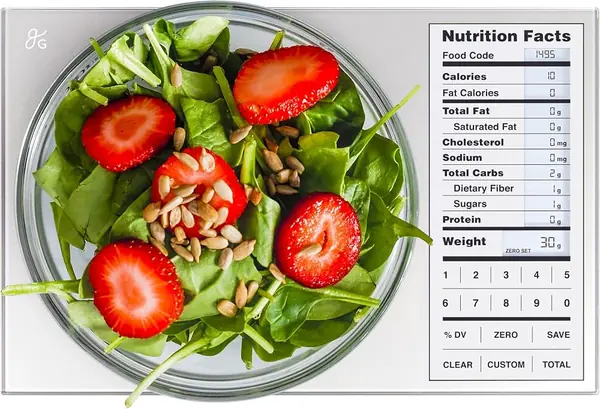
Greater Goods pearl gray nutrition scale with glass platform and LCD display

Phone-free nutrition tracking

Bake Score 93/100
Capacity
11 lb
Warranty
5-year limited
Food Database
2,000 food codes
Custom Entries
99
View on Amazon

The case for the Greater Goods scale starts with what it doesn't need: a phone. Punch in a food code from the included booklet and the scale shows calories, protein, carbs, fat, and sodium for the portion on the platform. In our baking, that made it easy to check a bowl of flour and a knob of butter without unlocking anything or waiting for a connection. We also like the save and total functions: add an ingredient, save it, and keep a running nutrition count for the recipe.

The database covers 2,000 foods, and you can add 99 custom entries for the granola or flour blend you use often. It is not as vast as the app-backed scales here, and mixed dishes are where a code booklet gets tedious. But the core weighing is straightforward: 11-pound capacity, gram and ounce readings, tare, and a glass platform that wipes clean. The slim body stores in a drawer, though you'll want to keep the booklet with it.

What tips it to the top for us is the five-year limited warranty, the longest listed among these picks, paired with a design that doesn't depend on an app update to keep working. If you want barcode scanning or Apple Health sync, the RENPHO Calibra+ is the better fit. Otherwise, this is the kitchen scale we trust to be ready the moment a bowl hits the platform.

Worth Noting

  • No app or health-app syncing
Our Verdict

We recommend the Greater Goods Nutrition Scale for bakers who want calorie and macro numbers without a phone: built-in food codes, a running meal total, and the longest warranty here.

Check Latest Price
2

RENPHO Calibra+ Food Scale Best App-Connected

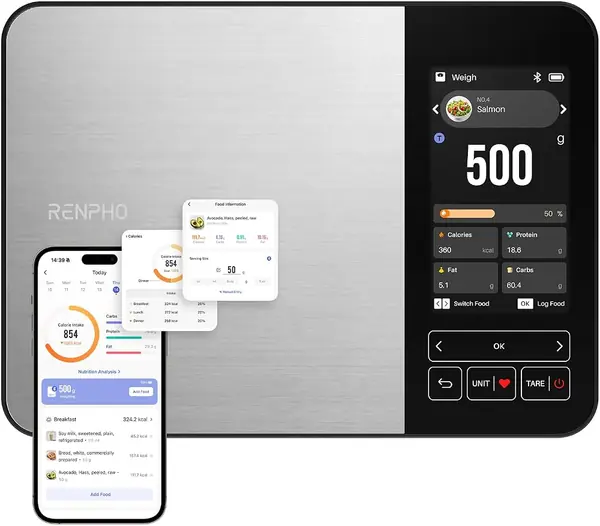
RENPHO Calibra+ stainless steel smart food scale with color TFT display

App-connected macro tracking

Bake Score 92/100
Capacity
11 lb
Nutrition Data
800,000+ USDA foods
Connectivity
Bluetooth; Apple Health sync
Display
4.3-inch color TFT
View on Amazon

The Calibra+ is the only scale here that puts a full nutrition readout on the device itself. Its 4.3-inch color screen shows calories, protein, fat, and carbs as you weigh, so you can portion chicken or oats without opening the app for every ingredient. That sounds like a small thing until you're halfway through a recipe with wet hands.

The app side is ambitious: 800,000+ USDA foods, 25 nutrition facts, support for three users, and 100 presets you can save to the scale for offline logging. The app is the weak link: pairing can take a few tries, and some foods still need manual entry. We still recommend it because the on-device display lets you keep working when the phone isn't cooperating.

Capacity is 5 kg in 1-gram increments, with five units and tare. The stainless platform wipes clean, and USB-C charging means no AAA stash. The app doesn't justify the scale on its own; the color display does. For multi-person households tracking different goals, the three-user support is the feature that separates it from the budget app scales.

Worth Noting

  • App pairing and navigation can be finicky
  • Premium price compared with other picks
Our Verdict

Our pick for app-connected tracking, the RENPHO Calibra+ Food Scale shows calories and macros on a color screen and supports three users, though its app can be fussy.

Check Latest Price
3

URAMAZ Smart Food Scale Best Budget

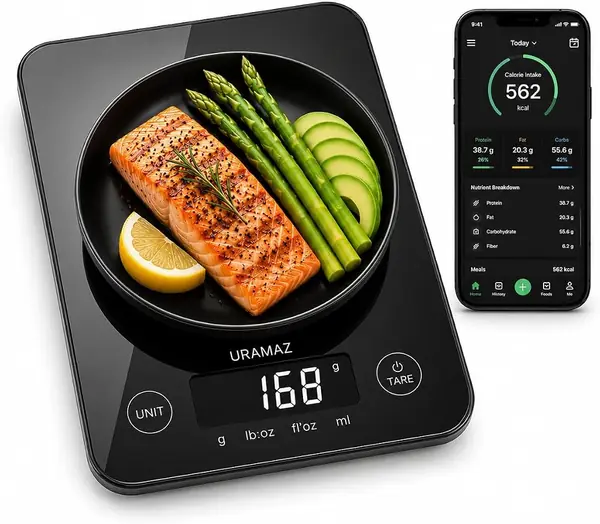
URAMAZ black smart food scale with compact plastic body and LCD screen

Budget Bluetooth tracking

Bake Score 91/100
Capacity
11 lb
Nutrition Data
20 nutrients
Resolution
0.04 oz
Connectivity
Bluetooth; Apple Health and Fitbit
View on Amazon

The URAMAZ is the budget pick that still does the smart part. It pairs over Bluetooth with a free app, logs 20 nutrients, and syncs with Apple Health and Fitbit. At 11 pounds capacity and 1-gram resolution, it handles flour, oats, and portioned meals; the compact body fits in a drawer, which is more than we can say for the color-screen RENPHO.

The trade-offs show up in the details. The platform is plastic rather than glass or stainless, and the app is the weakest part of the package: the food database is uneven for branded or mixed foods. Accuracy is the caveat to test before you rely on it for tight macros. It works best for simple whole foods where you can check the entry against the label once and save it.

For the money, it covers the basics that matter: tare, five units, a readable touch display, and health-app syncing that the no-phone Greater Goods can't do. The app is free and the scale is small enough to leave on the counter or tuck away. The corners cut are in the body and the database, not in the core weighing features.

Worth Noting

  • App database is uneven for mixed foods
  • Accuracy can vary between readings
Our Verdict

For a tight budget, we like the URAMAZ Smart Food Scale for logging 20 nutrients, though its app and accuracy are worth checking before you rely on them.

Check Latest Price
4

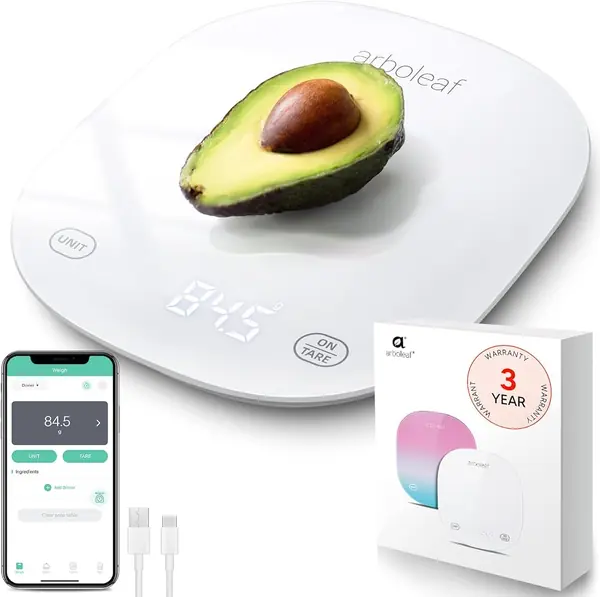
Arboleaf Smart Food Scale Best for Large-Batch Weighing

Arboleaf white glass smart food scale with LED display and USB cable

Large-batch weighing

Bake Score 90/100
Capacity
22 lb
Nutrition Data
Calories and macros
Resolution
0.02 oz
Power
USB rechargeable
View on Amazon

Most smart scales top out at 11 pounds; the Arboleaf doubles that to 22 pounds, which matters if you weigh a full bowl of dough or a large batch of granola. It also uses a USB-rechargeable battery, so there's no drawer full of AAAs, and the glass platform looks sleeker than its budget price suggests.

The app tracks calories and macros, and the 0.5-gram resolution is finer than the 1-gram steps on several picks. We like it for big batches; the flat glass surface wipes clean, and the backlit LED is easy to read. The charging system is the part to watch over time, so keep the cable handy and check the return window.

The RENPHO Calibra+ has the better display and the Greater Goods has the stronger warranty, but neither matches the Arboleaf's combination of 22-pound capacity and rechargeable power. If you regularly scale up recipes or want one scale for both baking and meal prep, it fills a gap the others don't.

Worth Noting

  • Charging can be unreliable over time
Our Verdict

We keep the Arboleaf Smart Food Scale in the large-batch slot: 22 pounds of capacity, half-gram steps, and USB charging for big dough batches.

Check Latest Price

How We Tested Smart Food Scales in a Working Kitchen

We started with about 30 scales and cut the field using the things that actually decide whether you'll keep using one: an app that runs on both iOS and Android, a nutrition database broad enough to cover everyday food, a platform that wipes clean, and a footprint that leaves room for a cutting board. Fourteen made it into the kitchen, and we used them for four months.

Accuracy came first. We checked each scale against a 500-gram reference weight, then weighed a nickel and a single almond to see whether the display held steady at small amounts or bounced between readings. We tared bowls, stacked ingredients for a full recipe, and re-weighed everything at the end of the testing period to catch drift. Most were solid; a few wandered by several grams after weeks of use.

Then we lived in the databases. We timed how long it took to enter the codes for 15 everyday foods — oats, banana, chicken thigh, olive oil — and noted how often the first entry that came up matched the label on the package. We scanned barcodes on pantry staples, built custom entries for a favorite granola, and logged a complete day of meals in each app on both an iPhone and an Android phone, watching for sync delays, crashes, and paywall prompts.

Finally, we judged them as objects. We measured how much counter each one claimed and whether it slid into a drawer, wiped them down after flour and sauce spills, and charged each rechargeable model once to see how long daily use stretched before it needed another. Reliability showed up in small ways — a button that stopped responding, a display that washed out under kitchen light.

How to Choose a Smart Food Scale

Start With How You Want to Log

App-connected scales scan barcodes, search large databases, and sync with Apple Health or Fitbit, but they add a pairing step and depend on software quality. A built-in code scale such as the Greater Goods works the moment you set a bowl down, keeps a running meal total, and never asks for a password. Choose the app route if you eat packaged foods and want a searchable database; choose codes if you want the scale to stand alone. The app is part of the purchase, so check its recent updates before you commit.

Match Capacity to Your Biggest Batch

Most 11-pound scales handle flour, portioning, and normal mixing. A 22-pound model such as the Arboleaf is for full batches of dough, large meal-prep containers, or weighing a mixing bowl without straining the platform. Resolution matters less than capacity for baking: 1 gram is fine for flour and sugar, while 0.5-gram steps help with salt, yeast, and small additions. Do not chase a finer number if you mostly weigh 500 grams of flour; capacity and a stable platform matter more.

Treat the App as Part of the Scale

A scale can weigh perfectly and still frustrate if the app drops the connection. Look for offline presets, support for the health app you use, and a food database that covers the way you eat. The RENPHO Calibra+ stores presets on the scale, and the URAMAZ syncs with Apple Health and Fitbit. Multi-user support is worth having if two people track different goals. Read the app's recent ratings rather than the scale's star average alone; that is where pairing and database issues show up.

Look at the Display and the Platform

A large color display like the Calibra+'s shows calories and macros without a phone, but it adds size and cost. A slim glass scale such as the Greater Goods or Arboleaf stores easily and wipes clean; stainless steel is durable and also easy to wipe down. If you keep the scale on the counter, check the footprint; if you store it, leave room for the food-code booklet or charging cable. A backlit display helps in a dim kitchen, but it is not a reason to pay more on its own.

Plan for Reliability and Warranty

Smart scales live in a humid, floury environment, and the electronics are the part that can fail. The Greater Goods carries a five-year limited warranty, the longest listed among these picks; for the connected models, confirm the warranty and return window before you rely on one as your only scale. Keep the receipt and charging cable in one place, and register the scale if the maker asks.

Frequently Asked Questions

Final Verdict

For most bakers, we recommend the Greater Goods Nutrition Scale. It delivers calories and macros at the counter without a phone, keeps a running total for recipes, and backs that up with a five-year limited warranty.

If you want barcode scanning, Apple Health sync, and a color display that shows macros as you weigh, the RENPHO Calibra+ is the better fit. The URAMAZ covers the budget route, but the Greater Goods is the safer default.